HostsMan Portable
HostsMan Portable is a Windows utility for managing the ... is affecting access to a site. For updates, HostsMan can retrieve online HOSTS files containing domain entries ...

HostsMan is a Windows utility for managing the system HOSTS file. It can enable or disable the file, apply content from online HOSTS sources, and let users edit mappings manually. Back up the file before making changes, since incorrect entries can affect how domains resolve on the computer. The program is freeware.
| Author: | abelhadigital.com |
| License: | Freeware |
| Price: | FREE |
| Released: | Jun 4, 2017 |
| File size: | 2.90 MB |
| Downloads: | 278 |
| Keywords: | error, manage Hosts, hosts file manager, manage domain mappings, user-friendly interface, hosts file backup, backup, efficient host management, Hosts, HostsMan, Windows 10 compatibility, x64 software, backup Hosts, edit hosts file, disable hosts file, scan Hosts, abelhadigital.com, update hosts file |
| Author URL: | https://www.abelhadigital.com/ |
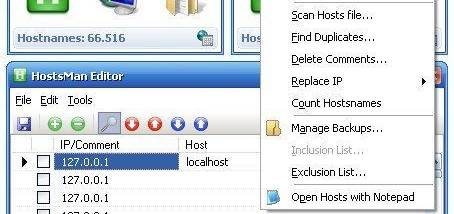

HostsMan is a Windows utility for managing the system HOSTS file, which maps hostnames to IP addresses before a computer contacts a domain through its usual DNS lookup. Users who need to maintain these mappings can use the program to enable or disable the file, edit its entries, and update it from online HOSTS sources. The file can also be used to direct selected domains to a particular address, including a local address when a domain should not resolve to its normal destination.
The update feature retrieves HOSTS content from online sources and applies it to the local file. This can save time compared with adding many entries by hand, particularly when maintaining a larger set of domain mappings. As the contents come from external lists, users should review the source and the entries before relying on them; a HOSTS file affects name resolution for the domains it contains and can change how those sites are reached.
For individual changes, HostsMan provides manual editing of the file. This is useful for adding, changing, or removing specific mappings, but it requires care: an incorrect entry can send a hostname to the wrong address or prevent it from resolving as intended. The program also provides controls to turn the HOSTS file on or off, which lets users temporarily test whether its entries are affecting access to a domain. Making a backup before editing or updating preserves a copy that can be restored if a change causes problems.
HostsMan is suited to users who want a dedicated interface for routine HOSTS-file maintenance rather than making every change directly in a text editor. Typical tasks include applying an online list, maintaining a few custom mappings, temporarily disabling the file while troubleshooting, and restoring a saved copy after an experiment. Because the HOSTS file is a system-level configuration, changes affect name resolution for the computer rather than just one browser; users unfamiliar with its format should read the program's documentation and keep a backup before making substantial edits.
The program is freeware and is intended for Windows. The available compatibility information includes Windows versions through Windows 10; Windows 11 support is not established here. HostsMan focuses on managing the local HOSTS file, so its online updates depend on the selected source and do not replace broader network or security controls.