Wireshark (x64bit)
... capture file formats, including files created by other network analysis tools. Users can capture traffic for immediate review or save it for offline analysis and sharing. Decryption support for many protocols, including ...

OmniPeek is a network analysis and troubleshooting application for network engineers and IT teams. It captures traffic from multiple local interfaces and connects to distributed OmniEngines for collection across remote sites. Analysis tools cover network traffic, VoIP signaling and media, playback, and voice and video expert analysis, supporting investigations into performance and service-level issues.
| Author: | WildPackets |
| License: | Trialware |
| Price: | $1259.00 |
| Released: | Nov 2, 2016 |
| File size: | 730.00 MB |
| Downloads: | 661 |
| Keywords: | analysis, voip analysis, traffic monitoring, debug network, data collection, troubleshooting software, network analyzer, WildPackets, network troubleshooting, packet inspection, network diagnostics, data visualization, debug, OmniPeek, packet capture tool, network analysis, troubleshoot |
| Author URL: | http://www.wildpackets.com |
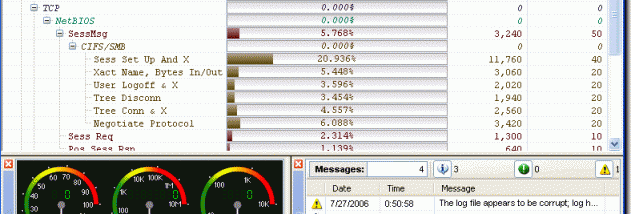

OmniPeek is a network analysis and troubleshooting application for network engineers and IT teams responsible for monitoring performance across an organization. It brings together packet capture, traffic analysis and distributed collection tools, helping professionals investigate connectivity problems, assess network behavior and review service-level performance at individual sites.
The application captures traffic from multiple local network interfaces and can connect to distributed OmniEngines to collect data from remote locations. This lets engineers examine activity across different parts of an organization without relying on a single capture point. OmniPeek supports collection across varied network topologies, including Gigabit and 10 Gigabit networks, WAN links and local matrix switches, making it suitable for environments with a mix of network segments and connection types.
For analysis, OmniPeek provides tools for examining captured traffic and identifying potential network issues. Its voice and video features cover signaling and media analysis, playback of VoIP traffic, and expert analysis for voice and video. Visual Expert adds a visual analysis option for investigating communications and network behavior. These capabilities help teams look beyond basic packet inspection when assessing call quality, media delivery or service problems.
OmniPeek is intended for practical use by network engineering professionals who need to troubleshoot faults, understand traffic patterns and monitor service levels across multiple sites. Distributed collection can support investigations when the affected users and the engineering team are in different locations, while local captures provide a closer view of activity on specific interfaces. The combination of general network analysis and voice and video diagnostics makes it useful for both infrastructure troubleshooting and communications monitoring.
OmniPeek is commercial trialware. The supplied operating-system information includes Windows versions through Windows 10; no Windows 11 compatibility is stated. The application is designed for professional network analysis, and its distributed collection model uses OmniEngines to gather traffic from remote points. Teams planning coverage across multiple sites can assess licensing requirements for each location supported by a network engineering professional.