Ping Tracer
Discover the power of network diagnostics with Ping Tracer, an innovative tool developed by bp2008 for Windows 10 users. This lightweight application combines the functionality of ...

WinMTR-Refresh combines ping and traceroute to help investigate slow, unstable or unreachable network connections. Enter a domain or IP address to view the route's hops and track latency and packet loss as probes run. Results can be exported for sharing, while settings for ping intervals and probe counts let users tailor a test. The open-source utility supports 64-bit Windows 10 and Windows 11.
| Author: | leeter |
| License: | Open Source |
| Price: | FREE |
| Released: | Nov 12, 2025 |
| File size: | 1.10 MB |
| Downloads: | 189 |
| Keywords: | WinMTR-Refresh, connection, winmtr alternative, open-source, open-source tool, ping, real-time monitoring, ping request, trace route packet loss, latency measurement, diagnose connection, network diagnostic tool, network diagnostics, Windows 10, diagnose, connection troubleshooting, WinMTR-Refresh free download, latency, download WinMTR-Refresh, ping tool, network latency test, leeter, route, ping and traceroute, packet loss |
| Author URL: | https://github.com/leeter/WinMTR-refresh |
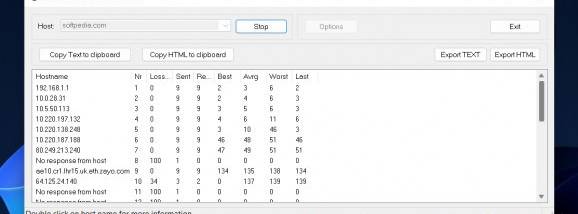


WinMTR-Refresh is an open-source network diagnostic utility for Windows that combines ping and traceroute in one interface. It is intended for users investigating slow, unstable or unreachable connections, including home users, IT support staff and network administrators. By testing a destination while displaying the route traffic takes to reach it, the program helps distinguish a problem affecting the connection as a whole from one associated with a particular point along the path.
To begin a test, the user enters a domain name or IP address. WinMTR-Refresh then sends repeated probes and presents results for the successive hops between the local computer and the destination. The live view makes it possible to follow changing latency and packet loss as measurements accumulate. Comparing the results across hops can help narrow down where delays or dropped packets first appear, although network routing and the way intermediate devices handle probes can affect what the measurements show.
The results include latency and packet-loss information, along with the number of hops in the route. Reports can be exported for later review or shared with a network administrator or support team, providing evidence that is more useful than a general report that a connection feels slow. Settings for the interval between pings and the number of pings per hop let users adjust how frequently measurements are taken and how much data a test collects. A shorter test can offer a quick check, while a longer run can help reveal intermittent changes.
Typical uses include investigating connection drops, checking whether a particular destination is reachable, comparing network performance over time and supplying route information during technical support. Network administrators can use repeated tests to observe a path, while learners can examine how traffic passes through a series of network hops and how latency or packet loss appears in the results. WinMTR-Refresh is a diagnostic aid rather than a repair tool: it reports measurements but does not change network settings or resolve the cause of a fault on its own.
The program is open source and is available for 64-bit editions of Windows 10 and Windows 11. Its compact download and focused interface make it suitable for running when troubleshooting is needed, without requiring a broader network-monitoring suite. Users interpreting a report should consider that results describe the route and conditions observed during the test; a single run may not represent every connection or time of day.