SpeedCommander
... contents without opening a separate utility. For remote file management, an integrated FTP client connects to servers and supports secure transfers. These tools are useful ...

SpeedCommander is a dual-pane file manager for copying, moving, sorting, and deleting files across local folders and FTP locations. It includes folder synchronization, file search, Quick View for common media, secure deletion, and extensive archive handling. FTP, SFTP, SSL-encrypted FTP, macros, and add-ins extend its file-management workflow.
| Author: | Sven Ritter |
| License: | Trialware |
| Price: | $39.95 |
| Released: | Apr 29, 2024 |
| File size: | 22.60 MB |
| Downloads: | 438 |
| Keywords: | secure file deletion, x64 folder comparison, data compression, x64 compression, file management, x64 FTP uploader, ftp file manager, x64 explorer, SpeedCommander x64, x64 extract, x64 file manager, advanced search, Sven Ritter, folder comparison software, dual pane file manager, dual-pane interface, file synchronization tool, archive manager |
| Author URL: | https://www.speedproject.de/ |
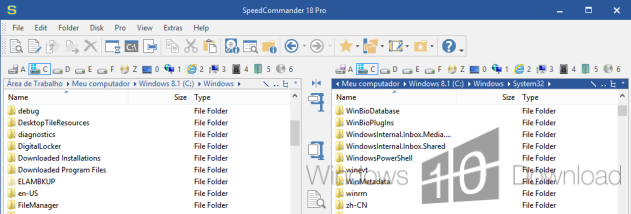

SpeedCommander is a dual-pane file manager for organizing files on Windows. Its side-by-side folder windows keep the source and destination visible during common tasks, making it useful for people who regularly copy, move, compare, or sort files across local drives, network locations, and FTP sites. Operations can be performed with the mouse or keyboard, and the interface provides an alternative to managing folders in separate Windows Explorer windows.
The two-pane layout helps when transferring files: users can browse to a source in one window and a destination in the other, then copy or move items between them. SpeedCommander also includes folder synchronization for keeping selected locations aligned, and search tools for finding files and folders across storage media. Quick View offers a way to inspect supported content, including pictures, video, and music, without opening each item in a separate application. For deletion tasks that require more than ordinary removal, the program includes secure deletion.
Compressed files can be handled much like folders, allowing users to browse archive contents and extract or create archives within the file manager. Archive support includes compression profiles for reusing settings, self-extracting archives for recipients without extraction software, and recovery data intended to help protect archives against damage. The add-in interface can extend the program with additional functions and file systems; its COM-based integration allows add-ins to interact with folder windows and their contents. Support for FTP, SFTP over SSH, and SSL-encrypted FTP provides access to remote locations, with proxy support also available.
Macros can automate repeated tasks and work with SpeedCommander's objects and script-capable components. An integrated editor and debugger help users create and check scripts. These tools suit workflows such as recurring file organization, archive handling, folder synchronization, and transfers to or from remote servers. Keyboard and mouse controls accommodate different working styles, while the two-window design keeps file operations easy to follow.
SpeedCommander is trialware and is intended for 64-bit Windows systems, including Windows 10 and Windows 11. The supplied feature information notes that the interface is available in German, which may be a consideration for users who need another language. Its broad archive and transfer functions make it a practical choice for users who want file management, compression, synchronization, search, and FTP access in one application.