TCPView for Windows 10 - Full description
TCPView is a Windows network-monitoring utility for inspecting the TCP connections and UDP endpoints active on a computer. It presents network activity in a live table, making it useful for administrators and technically minded users who need to see which addresses are communicating, check connection states, or investigate unexpected network traffic. Its graphical interface offers a more immediately readable view of endpoint information than a command-line listing.
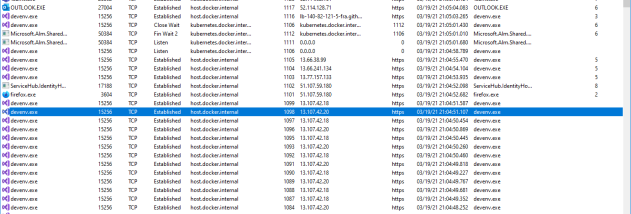
At startup, TCPView enumerates active TCP and UDP endpoints and displays details such as local and remote addresses and, for TCP connections, their current state. It can resolve IP addresses to domain names, helping identify remote hosts without requiring a separate lookup; resolved names can be switched off when numeric addresses are preferable. The process associated with an endpoint is also shown, allowing users to connect network activity with the software that opened it. This can help distinguish expected application traffic from connections that warrant closer inspection.
The display refreshes periodically, with the refresh interval adjustable in the options. Color highlights make changes easier to follow: new endpoints appear in green, entries that have been removed appear in red, and endpoints whose state has changed are highlighted in yellow. These visual cues are useful when watching a busy system, since users can spot connection changes without manually comparing successive tables. The output can also be saved to a file for later review or record keeping.
TCPView can close established TCP connections from its interface, either through a menu command or the connection's context menu. This gives an administrator a direct way to terminate a selected connection, though closing a connection may interrupt the application using it. For scripted checks or terminal-based workflows, the download includes Tcpvcon, a command-line counterpart with similar endpoint reporting. Tcpvcon can show all endpoints, filter output by process name or process ID, print results as CSV, and skip address resolution; its options suit automation and importing results into other tools.
TCPView is freeware from Microsoft and is intended for Windows systems. It is suited to troubleshooting local network activity, checking which programs have open connections, and reviewing TCP and UDP endpoint changes. The graphical view is convenient for interactive monitoring, while Tcpvcon provides a compact alternative for command-line use. Address resolution and frequent updates can make changing network activity easier to understand, but the information is a snapshot of endpoints on the local computer rather than a general-purpose network traffic capture.