WinMTR-Refresh
WinMTR-Refresh is an open-source network diagnostic utility for Windows ... user enters a domain name or IP address. WinMTR-Refresh then sends repeated probes and presents results for ...

WinMTR is a Windows network diagnostic utility that combines ping and traceroute in one graphical tool. Enter a hostname or IP address to see the route to the destination while repeatedly measuring responses from each hop. The results help investigate packet loss, latency and intermittent connectivity, and can provide useful evidence for network support teams. WinMTR is open source and is intended for troubleshooting, not for changing or repairing network settings.
| Author: | Vasile Laurentiu Stanimir |
| License: | Open Source |
| Price: | FREE |
| Released: | Feb 16, 2011 |
| File size: | 1.90 MB |
| Downloads: | 319 |
| Keywords: | network route diagnostic, network latency monitor, network diagnostic tool, tracert hostname, ping hostname, Windows 10 compatible, ping, Vasile Laurentiu Stanimir, SourceForge download, winmtr download, packet loss test, WinMTR, ping and traceroute tool, pinger, tracert, open-source software, hostname pinger, trace route to hostname |
| Author URL: | http://winmtr.net/ |
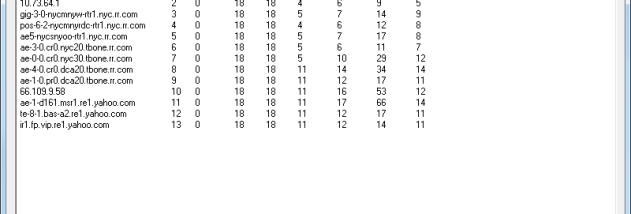

WinMTR is a Windows network diagnostic utility for people investigating slow connections, dropped traffic or difficulty reaching a server. It combines ping, which measures responses from a destination, with traceroute, which shows the network hops taken along the way. The results help distinguish a problem affecting the local connection from one that appears farther along the route.
To use it, the operator enters a hostname or IP address and starts a test. WinMTR repeatedly sends probes while tracing the route, then displays the responding hops and statistics for each one. The live results make it possible to see whether packet loss or high response times affect a particular point on the path, rather than relying on a single ping or a one-time route trace. Tests can be left running to observe whether a fault is persistent or intermittent.
The combined view is useful because latency and packet loss at one hop do not always indicate a fault at that hop: some routers limit or deprioritize diagnostic responses while still forwarding traffic normally. Comparing the figures across successive hops and with the destination helps identify where a change begins and whether it continues through the route. This context can make a report more useful to an internet provider, hosting company or network administrator than a general claim that a connection feels slow.
WinMTR is suited to troubleshooting access to websites, game servers, hosted services and other network destinations. Home users can use it to investigate intermittent connectivity, while IT staff and support teams can gather route and response data when diagnosing reachability or performance complaints. It is a diagnostic tool rather than a repair utility: it measures and presents network behavior, but does not alter routing, configure a connection or fix an upstream problem.
The application is open source and is intended for Microsoft Windows. Windows 10 is included among its supported operating systems; the supplied compatibility information does not establish support for Windows 11. WinMTR is a graphical alternative to running separate ping and traceroute commands, with results collected in one place for inspection. Its measurements describe the tested route at the time of the test, so repeating a run can help when network conditions vary.